Introduction to dataRetrieval

Laura DeCicco

Introduction

The goal of these slides are to:

  • Introduce the modern USGS water data concepts

  • Introduce basic dataretrieval workflows (R and Python)

  • Introduce additional topics that often come up

Software Installation

dataRetrieval is available on the Comprehensive R Archive Network (CRAN) repository. To install dataRetrieval on your computer, open RStudio and run this line of code in the Console:

install.packages("dataRetrieval")

Then each time you open R, you’ll need to load the library:

library(dataRetrieval)
pip install dataretrieval

or

conda install conda-forge::dataretrieval

Then each time you open Python, you’ll need to load the library:

from dataretrieval import waterdata

External Documentation

Internal Documentation

Within R, you can call help files for any dataRetrieval function:
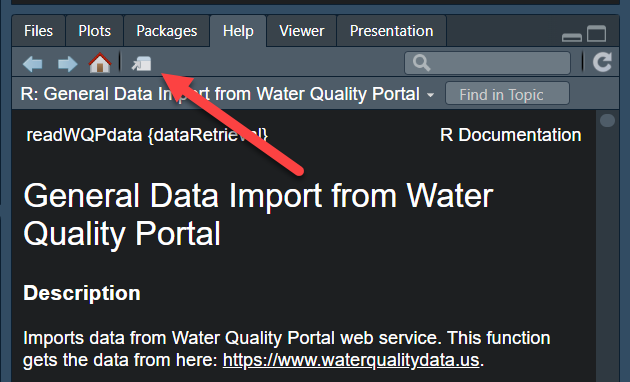
?read_waterdata_daily

Click here to open a new window in RStudio:

Scroll down to the “Examples” to see how each function can be run.

Examples

site <- "USGS-02238500"
dv_data_sf <- read_waterdata_daily(
  monitoring_location_id = site,
  parameter_code = "00060",
  time = c("2021-01-01", "2022-01-01")
)

Within Python, you can call help for any dataretrieval function:

help(waterdata.get_daily)
Help on function get_daily in module dataretrieval.waterdata.api:

get_daily(monitoring_location_id: 'str | Iterable[str] | None' = None, parameter_code: 'str | Iterable[str] | None' = None, statistic_id: 'str | Iterable[str] | None' = None, properties: 'str | Iterable[str] | None' = None, time_series_id: 'str | Iterable[str] | None' = None, daily_id: 'str | Iterable[str] | None' = None, approval_status: 'str | Iterable[str] | None' = None, unit_of_measure: 'str | Iterable[str] | None' = None, qualifier: 'str | Iterable[str] | None' = None, value: 'str | Iterable[str] | None' = None, last_modified: 'str | None' = None, skip_geometry: 'bool | None' = None, time: 'str | Iterable[str] | None' = None, bbox: 'list[float] | None' = None, limit: 'int | None' = None, filter: 'str | None' = None, filter_lang: 'FILTER_LANG | None' = None, convert_type: 'bool' = True) -> 'tuple[pd.DataFrame, BaseMetadata]'
    Daily data provide one data value to represent water conditions for the
    day.

    Throughout much of the history of the USGS, the primary water data available
    was daily data collected manually at the monitoring location once each day.
    With improved availability of computer storage and automated transmission of
    data, the daily data published today are generally a statistical summary or
    metric of the continuous data collected each day, such as the daily mean,
    minimum, or maximum value. Daily data are automatically calculated from the
    continuous data of the same parameter code and are described by parameter
    code and a statistic code. These data have also been referred to as “daily
    values” or “DV”.

    Parameters
    ----------
    monitoring_location_id : string or iterable of strings, optional
        A unique identifier representing a single monitoring location. This
        corresponds to the id field in the monitoring-locations endpoint.
        Monitoring location IDs are created by combining the agency code of
        the agency responsible for the monitoring location (e.g. USGS) with
        the ID number of the monitoring location (e.g. 02238500), separated
        by a hyphen (e.g. USGS-02238500).
    parameter_code : string or iterable of strings, optional
        Parameter codes are 5-digit codes used to identify the constituent
        measured and the units of measure. A complete list of parameter
        codes and associated groupings can be found at
        https://help.waterdata.usgs.gov/codes-and-parameters/parameters.
    statistic_id : string or iterable of strings, optional
        A code corresponding to the statistic an observation represents.
        Example codes include 00001 (max), 00002 (min), and 00003 (mean).
        A complete list of codes and their descriptions can be found at
        https://help.waterdata.usgs.gov/code/stat_cd_nm_query?stat_nm_cd=%25&fmt=html.
    properties : string or iterable of strings, optional
        A vector of requested columns to be returned from the query.
        Available options are: geometry, id, time_series_id,
        monitoring_location_id, parameter_code, statistic_id, time, value,
        unit_of_measure, approval_status, qualifier, last_modified
    time_series_id : string or iterable of strings, optional
        A unique identifier representing a single time series. This
        corresponds to the id field in the time-series-metadata endpoint.
    daily_id : string or iterable of strings, optional
        A universally unique identifier (UUID) representing a single version of
        a record. It is not stable over time. Every time the record is refreshed
        in our database (which may happen as part of normal operations and does
        not imply any change to the data itself) a new ID will be generated. To
        uniquely identify a single observation over time, compare the time and
        time_series_id fields; each time series will only have a single
        observation at a given time.
    approval_status : string or iterable of strings, optional
        Some of the data that you have obtained from this U.S. Geological Survey
        database may not have received Director's approval. Any such data values
        are qualified as provisional and are subject to revision. Provisional
        data are released on the condition that neither the USGS nor the United
        States Government may be held liable for any damages resulting from its
        use. This field reflects the approval status of each record, and is either
        "Approved", meaning processing review has been completed and the data is
        approved for publication, or "Provisional" and subject to revision. For
        more information about provisional data, go to:
        https://waterdata.usgs.gov/provisional-data-statement/.
    unit_of_measure : string or iterable of strings, optional
        A human-readable description of the units of measurement associated
        with an observation.
    qualifier : string or iterable of strings, optional
        This field indicates any qualifiers associated with an observation, for
        instance if a sensor may have been impacted by ice or if values were
        estimated.
    value : string or iterable of strings, optional
        The value of the observation. Values are transmitted as strings in
        the JSON response format in order to preserve precision.
    last_modified : string, optional
        The last time a record was refreshed in our database. This may happen
        due to regular operational processes and does not necessarily indicate
        anything about the measurement has changed. You can query this field
        using date-times or intervals, adhering to RFC 3339, or using ISO 8601
        duration objects. Intervals may be bounded or half-bounded (double-dots
        at start or end).
        Examples:

            * A date-time: "2018-02-12T23:20:50Z"
            * A bounded interval: "2018-02-12T00:00:00Z/2018-03-18T12:31:12Z"
            * Half-bounded intervals: "2018-02-12T00:00:00Z/.." or
                "../2018-03-18T12:31:12Z"
            * Duration objects: "P1M" for data from the past month or
                "PT36H" for the last 36 hours

        Only features that have a last_modified that intersects the value of
        datetime are selected.
    skip_geometry : boolean, optional
        This option can be used to skip response geometries for each feature.
        The returning object will be a data frame with no spatial information.
        Note that the USGS Water Data APIs use camelCase "skipGeometry" in
        CQL2 queries.
    time : string, optional
        The date an observation represents. You can query this field using
        date-times or intervals, adhering to RFC 3339, or using ISO 8601
        duration objects. Intervals may be bounded or half-bounded (double-dots
        at start or end). Only features that have a time that intersects the
        value of datetime are selected. If a feature has multiple temporal
        properties, it is the decision of the server whether only a single
        temporal property is used to determine the extent or all relevant
        temporal properties.
        Examples:

            * A date-time: "2018-02-12T23:20:50Z"
            * A bounded interval: "2018-02-12T00:00:00Z/2018-03-18T12:31:12Z"
            * Half-bounded intervals: "2018-02-12T00:00:00Z/.." or
                "../2018-03-18T12:31:12Z"
            * Duration objects: "P1M" for data from the past month or
                "PT36H" for the last 36 hours

    bbox : list of numbers, optional
        Only features that have a geometry that intersects the bounding box are
        selected.  The bounding box is provided as four or six numbers,
        depending on whether the coordinate reference system includes a vertical
        axis (height or depth). Coordinates are assumed to be in crs 4326. The
        expected format is a numeric vector structured: c(xmin,ymin,xmax,ymax).
        Another way to think of it is c(Western-most longitude, Southern-most
        latitude, Eastern-most longitude, Northern-most longitude).
    limit : numeric, optional
        The optional limit parameter is used to control the subset of the
        selected features that should be returned in each page. The maximum
        allowable limit is 50000. It may be beneficial to set this number lower
        if your internet connection is spotty. The default (NA) will set the
        limit to the maximum allowable limit for the service.
    filter, filter_lang : optional
        Server-side CQL filter passed through as the OGC ``filter`` /
        ``filter-lang`` query parameters. See
        :mod:`dataretrieval.waterdata.filters` for syntax, auto-chunking,
        and the lexicographic-comparison pitfall.
    convert_type : boolean, optional
        If True, converts columns to appropriate types.

    Returns
    -------
    df : ``pandas.DataFrame`` or ``geopandas.GeoDataFrame``
        Formatted data returned from the API query.
    md: :obj:`dataretrieval.utils.Metadata`
        A custom metadata object

    Examples
    --------
    .. code::

        >>> # Get daily flow data from a single site
        >>> # over a yearlong period
        >>> df, md = dataretrieval.waterdata.get_daily(
        ...     monitoring_location_id="USGS-02238500",
        ...     parameter_code="00060",
        ...     time="2021-01-01T00:00:00Z/2022-01-01T00:00:00Z",
        ... )

        >>> # Quick "show me the last week" idiom (ISO 8601 duration)
        >>> df, md = dataretrieval.waterdata.get_daily(
        ...     monitoring_location_id="USGS-02238500",
        ...     parameter_code="00060",
        ...     time="P7D",
        ... )

        >>> # Get approved daily flow data from multiple sites
        >>> df, md = dataretrieval.waterdata.get_daily(
        ...     monitoring_location_id=["USGS-05114000", "USGS-09423350"],
        ...     approval_status="Approved",
        ...     time="2024-01-01/..",
        ... )

        >>> # Pull only rows whose underlying record was refreshed in the
        >>> # last 7 days — handy for incremental ETL polling
        >>> df, md = dataretrieval.waterdata.get_daily(
        ...     monitoring_location_id="USGS-02238500",
        ...     parameter_code="00060",
        ...     last_modified="P7D",
        ... )

        >>> # Chain queries: pull all stream sites in a state, then their
        >>> # daily discharge for the last week. The site list can be hundreds
        >>> # of values long — the request is transparently chunked across
        >>> # multiple sub-requests so the URL stays under the server's byte
        >>> # limit. Combined output looks like a single query.
        >>> sites_df, _ = dataretrieval.waterdata.get_monitoring_locations(
        ...     state_name="Ohio",
        ...     site_type="Stream",
        ... )
        >>> df, md = dataretrieval.waterdata.get_daily(
        ...     monitoring_location_id=sites_df["monitoring_location_id"].tolist(),
        ...     parameter_code="00060",
        ...     time="P7D",
        ... )

USGS Water Data Concepts

USGS Water Data APIs

  • Continuous (e.g. 15-minute sensor data)

  • Daily (e.g. mean from continuous)

  • Monitoring Location Information

  • Time Series Information

  • Latest Daily/Continuous

  • Field Measurements

USGS Water Data APIs

  • Peak Flows

  • Rating Curves

  • Discrete Water-Quality

Water Quality Portal (WQP) Data

  • Discrete water-quality data (USGS & others)

Each of these is has a different:

  • API endpoint
  • dataRetrieval function
  • Output format

USGS Basic Retrievals

The USGS uses various codes for basic retrievals. These codes can have leading zeros, therefore they need to be a character surrounded in quotes (“00060”).

  • Site ID (often 8 or 15-digits)
  • Parameter Code (5 digits)
    • Full list: read_metadata("parameter-codes")
  • Statistic Code (for daily values)
    • Full list: read_metadata("statistic-codes")

USGS Basic Retrievals Parameter and Statistic Codes

Here are some examples of a few common codes:

Parameter Code Short Name
00060 Discharge
00065 Gage Height
00010 Temperature
00400 pH
Statistic Code Short Name
00001 Maximum
00002 Minimum
00003 Mean
00008 Median

dataRetrieval can help!

parameter_codes <- read_waterdata_metadata("parameter-codes")
statistic_codes <- read_waterdata_metadata("statistic-codes")
# Others:
agency_codes <- read_waterdata_metadata("agency-codes")
aquifer_codes <- read_waterdata_metadata("aquifer-codes")
aquifer_types <- read_waterdata_metadata("aquifer-types")
coordinate_datum_codes <- read_waterdata_metadata("coordinate-datum-codes")
huc_codes <- read_waterdata_metadata("hydrologic-unit-codes")
national_aquifer_codes <- read_waterdata_metadata("national-aquifer-codes")
reliability_codes <- read_waterdata_metadata("reliability-codes")
site_types <- read_waterdata_metadata("site-types")
topographic_codes <- read_waterdata_metadata("topographic-codes")
time_zone_codes <- read_waterdata_metadata("time-zone-codes")
counties <- read_waterdata_metadata("counties")
states <- read_waterdata_metadata("states")
parameter_codes = waterdata.get_reference_table("parameter-codes")
statistic_codes = waterdata.get_reference_table("statistic-codes")
# Others:
agency_codes = waterdata.get_reference_table("agency-codes")
aquifer_codes = waterdata.get_reference_table("aquifer-codes")
aquifer_types = waterdata.get_reference_table("aquifer-types")
coordinate_datum_codes = waterdata.get_reference_table("coordinate-datum-codes")
huc_codes = waterdata.get_reference_table("hydrologic-unit-codes")
national_aquifer_codes = waterdata.get_reference_table("national-aquifer-codes")
reliability_codes = waterdata.get_reference_table("reliability-codes")
site_types = waterdata.get_reference_tablea("site-types")
topographic_codes = waterdata.get_reference_table("topographic-codes")
time_zone_codes = waterdata.get_reference_table("time-zone-codes")
counties = waterdata.get_reference_table("counties")
states = waterdata.get_reference_table("states")

Each function returns a Tuple, containing a dataframe and a Metadata class.

Exercise 1: Orientation

  1. Open your preferred IDE (RStudio, VSCode, PyCharm, etc) or Jupyter notebook

  2. Install packages if needed:

  • R: dataRetrieval, ggplot2, dplyr, leaflet

  • Python: dataretrieval, matplotlib, geopandas, folium, seaborn

  1. Load dataRetrieval (R) / waterdata module in dataretrieval (Python)

  2. Open the help file for the function read_waterdata_daily (R) or waterdata.get_daily (Python)

install.packages(c("dataRetrieval", "ggplot2", "leaflet", "dplyr"))
library(dataRetrieval)
?read_waterdata_daily
pip install dataretrieval matplotlib geopandas folium seaborn
from dataretrieval import waterdata

help(waterdata.get_daily)

USGS Water Data API Token

  • The Water Data APIs limit how many queries a single IP address can make per hour

  • You can run new dataRetrieval functions without a token

  • You might run into errors quickly. If you (or your IP!) have exceeded the quota, you will see:

! HTTP 429 Too Many Requests.
  • You have exceeded your rate limit. Make sure you provided your API key from https://api.waterdata.usgs.gov/signup/, then either try again later or contact us at https://waterdata.usgs.gov/questions-comments/?referrerUrl=https://api.waterdata.usgs.gov for assistance.

USGS Water Data API Token

  1. Request a USGS Water Data API Token: https://api.waterdata.usgs.gov/signup/

  2. Save it in a safe place (KeyPass or other password management tool)

  3. Add it as environment variable

  4. Restart

See next slide for a demonstration.

Water Data API Token: Example

Let’s pretend the token sent you was “abc123”

  1. Run in R:
usethis::edit_r_environ()
  1. Add this line to the file that opens up:
API_USGS_PAT = "abc123"
  1. Save that file

  2. Restart R/RStudio.

  3. Check that it worked by running (you should see your token printed in the Console):

Sys.getenv("API_USGS_PAT")

Note

Your .Renviorn file should never be pushed to a public repository.

  1. Create a file in your working directory .env

  2. Add this line to the .env file:

API_USGS_PAT = "abc123"
  1. Restart your python session

  2. Check that it worked by running (you should see your token printed in the Console):

import os

os.getenv("API_USGS_PAT")
"abc123"

Note

Your .env file should never be pushed to a public repository.

  1. Open Miniforge, Anaconda, etc.

  2. Activate enviornment

conda activate flow_bootcamp
  1. Add variable:
conda env config vars set API_USGS_PAT="abc123"
  1. Reactivate enviornment
conda activate flow_bootcamp
  1. Open your enviornment (for example Jupyter), and test that it’s there:
import os

print(os.getenv("API_USGS_PAT"))
"abc123"

Within your code, add:

import os
os.environ["API_USGS_PAT"] = "abc123"

This is not ideal because you are hard-coding your personal access token in the script/notebook. You would not want to share this code on a public repository for example.

Water Data APIs: Initial Tips

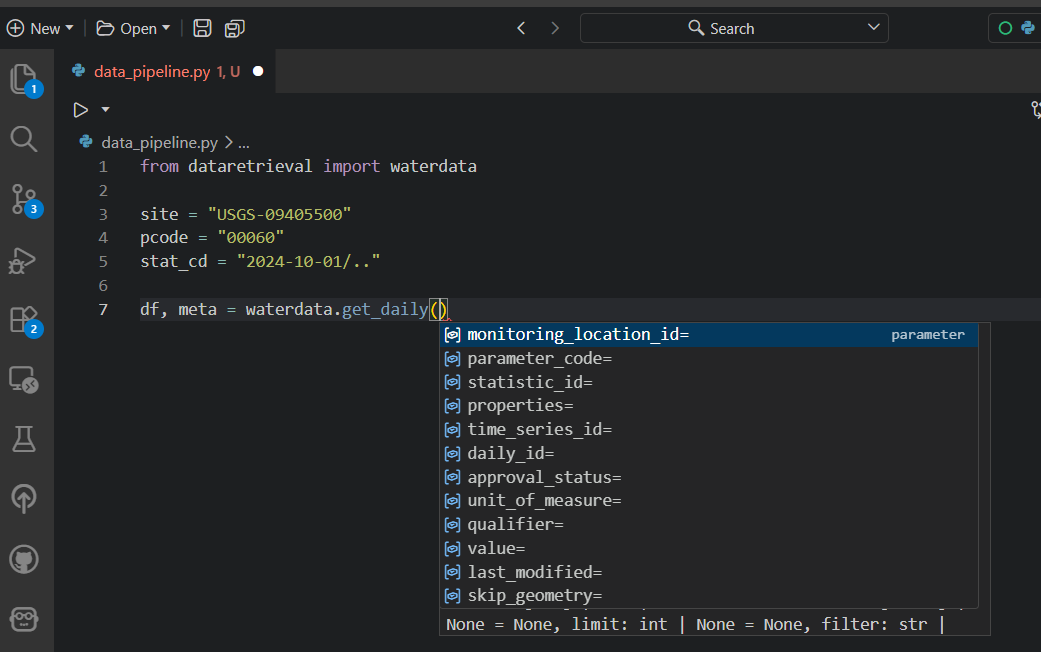
Use your “tab” key!
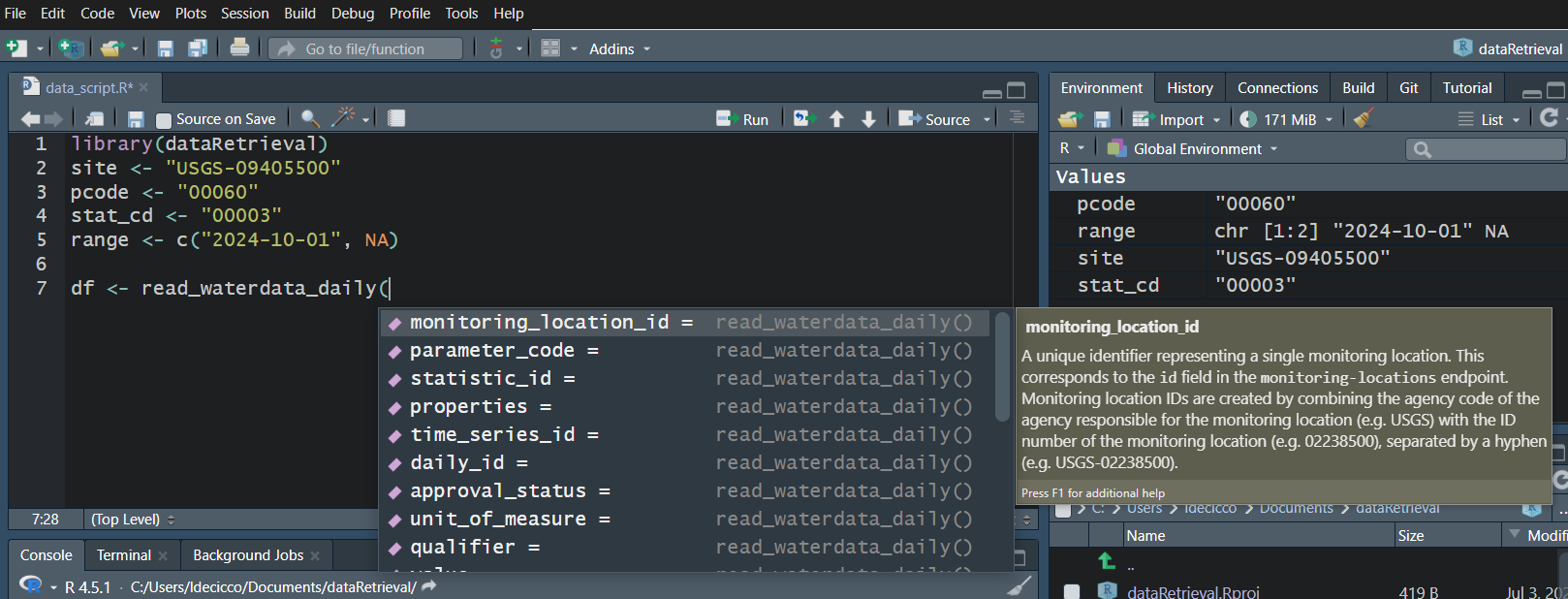
Shift + Tab:
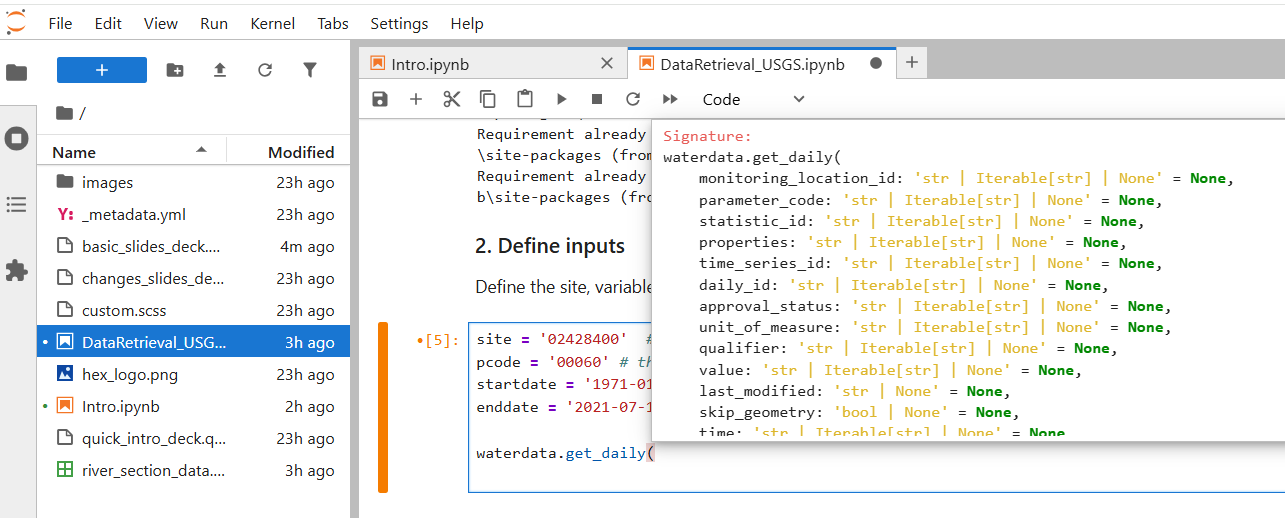
Water Data API Notes: Arguments

  • When you look at the help file for the new functions, you’ll notice there are lots of possible inputs parameters.

  • You DO NOT need to (and should not!) specify all of these parameters.

  • However, also consider what happens if you leave too many things blank. What do you suppose will be returned here?

discharge <- read_waterdata_daily(
  parameter_code = "00060",
  statistic_id = "00003"
)

Since no list of sites or bounding box was defined, ALL the daily data in ALL the country with parameter code “00060” and statistic code “00003” will be returned.

Water Data API Notes: time input

Time parameters have a few options:

  • A single date (or date-time): “2024-10-01” or “2024-10-01T23:20:50Z”

  • A bounded interval: c(“2024-10-01”, “2025-07-02”)

  • Half-bounded intervals: c(“2024-10-01”, NA)

  • Duration objects: “P1M” for data from the past month or “PT36H” for the last 36 hours

Here are a bunch of valid inputs:

# Ask for exact times:
time = "2025-01-01"
time = as.Date("2025-01-01")
time = "2025-01-01T23:20:50Z"
time = as.POSIXct(
  "2025-01-01T23:20:50Z",
  format = "%Y-%m-%dT%H:%M:%S",
  tz = "UTC"
)
# Ask for specific range
time = c("2024-01-01", "2025-01-01") # or Dates or POSIXs
# Asking beginning of record to specific end:
time = c(NA, "2024-01-01") # or Date or POSIX
# Asking specific beginning to end of record:
time = c("2024-01-01", NA) # or Date or POSIX
# Ask for period
time = "P1M" # past month
time = "P7D" # past 7 days
time = "PT12H" # past hours
# Ask for exact times:
time = "2025-01-01"
# Ask for specific range
time = "2025-01-01/2026-01-01"
# Asking beginning of record to specific end:
time = "../2024-01-01"  # or Date or POSIX
# Asking specific beginning to end of record:
time = "2024-01-01/.."  # or Date or POSIX
# Ask for period
time = "P1M"  # past month
time = "P7D"  # past 7 days
time = "PT12H"  # past hours

Let’s Go!

  • Workflow 1: Find Available Sites

  • Workflow 2: Find Available Data

  • Challenge 1

  • Workflow 3: Get Latest Data

  • Workflow 4: Get All Data

  • Challenge 2

  • Workflow 5: Discrete Water Quality

Workflow 1: Find Available Sites

Let’s get all the monitoring locations for Dane County, Wisconsin:

site_info <- read_waterdata_monitoring_location(
  state_name = "Wisconsin",
  county_name = "Dane County"
)
site_info, md = waterdata.get_monitoring_locations(
    state_name="Wisconsin", county_name="Dane County"
)

Note on county names

read_waterdata_monitoring_location requires “County” in the county_name argument. You can check county names using:

counties <- check_waterdata_sample_params(service = "counties")

site_info

site_info_refined

Now that we’ve seen the whole data set, maybe we realize in the future we can ask for just stream sites, and we only really need a few of those columns:

site_info_refined <- read_waterdata_monitoring_location(
  state_name = "Wisconsin",
  county_name = "Dane County",
  site_type = "Stream",
  properties = c(
    "monitoring_location_id",
    "monitoring_location_name",
    "drainage_area",
    "geometry"
  )
)
Requesting:
https://api.waterdata.usgs.gov/ogcapi/v0/collections/monitoring-locations/items?f=json&lang=en-US&properties=monitoring_location_name%2Cdrainage_area&state_name=Wisconsin&county_name=Dane%20County&site_type=Stream&limit=50000
Remaining requests this hour:1954 
site_info_refined, md = waterdata.get_monitoring_locations(
    state_name="Wisconsin",
    county_name="Dane County",
    site_type="Stream",
    properties=[
        "monitoring_location_id",
        "monitoring_location_name",
        "drainage_area",
        "geometry",
    ],
)

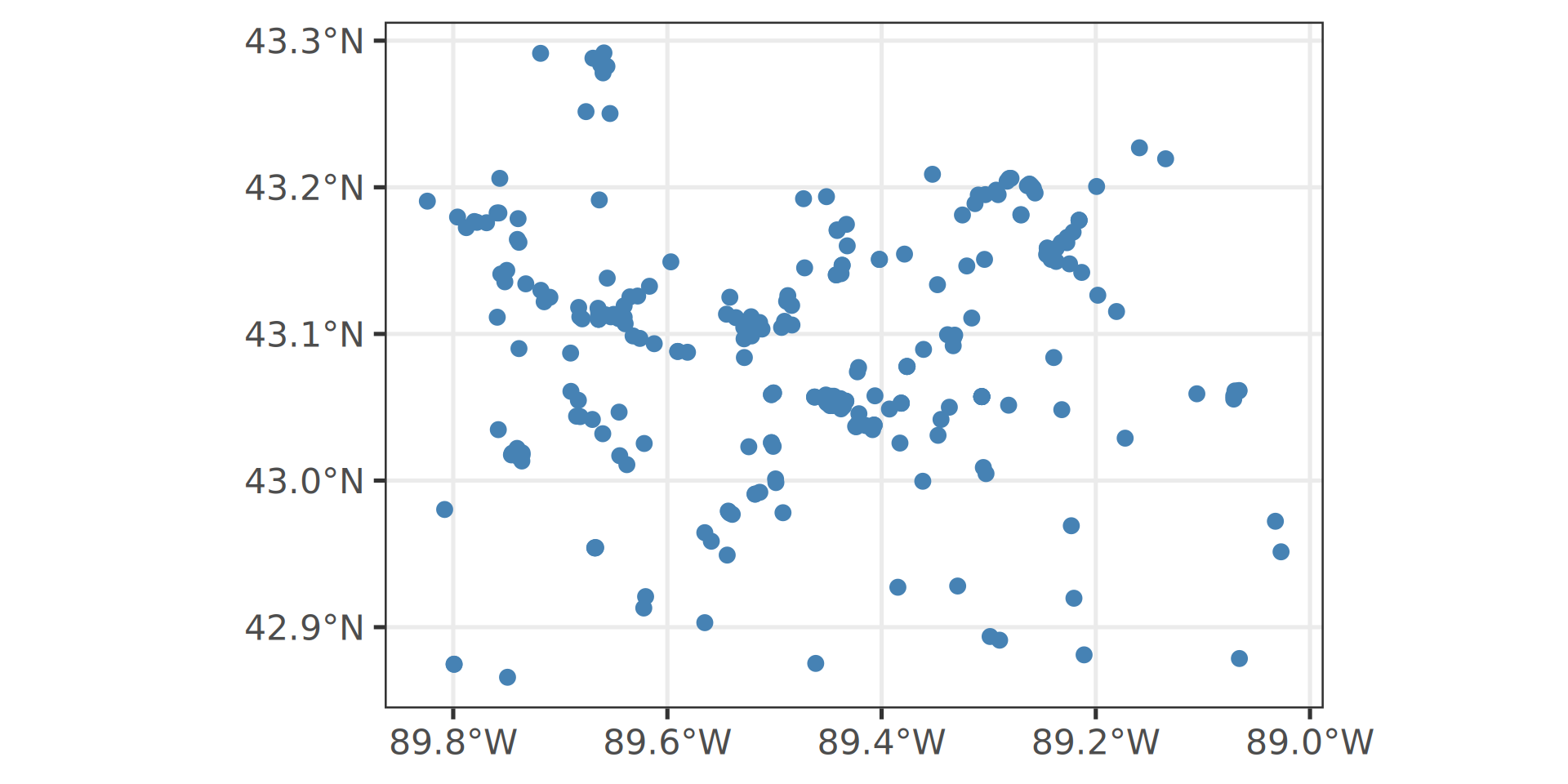
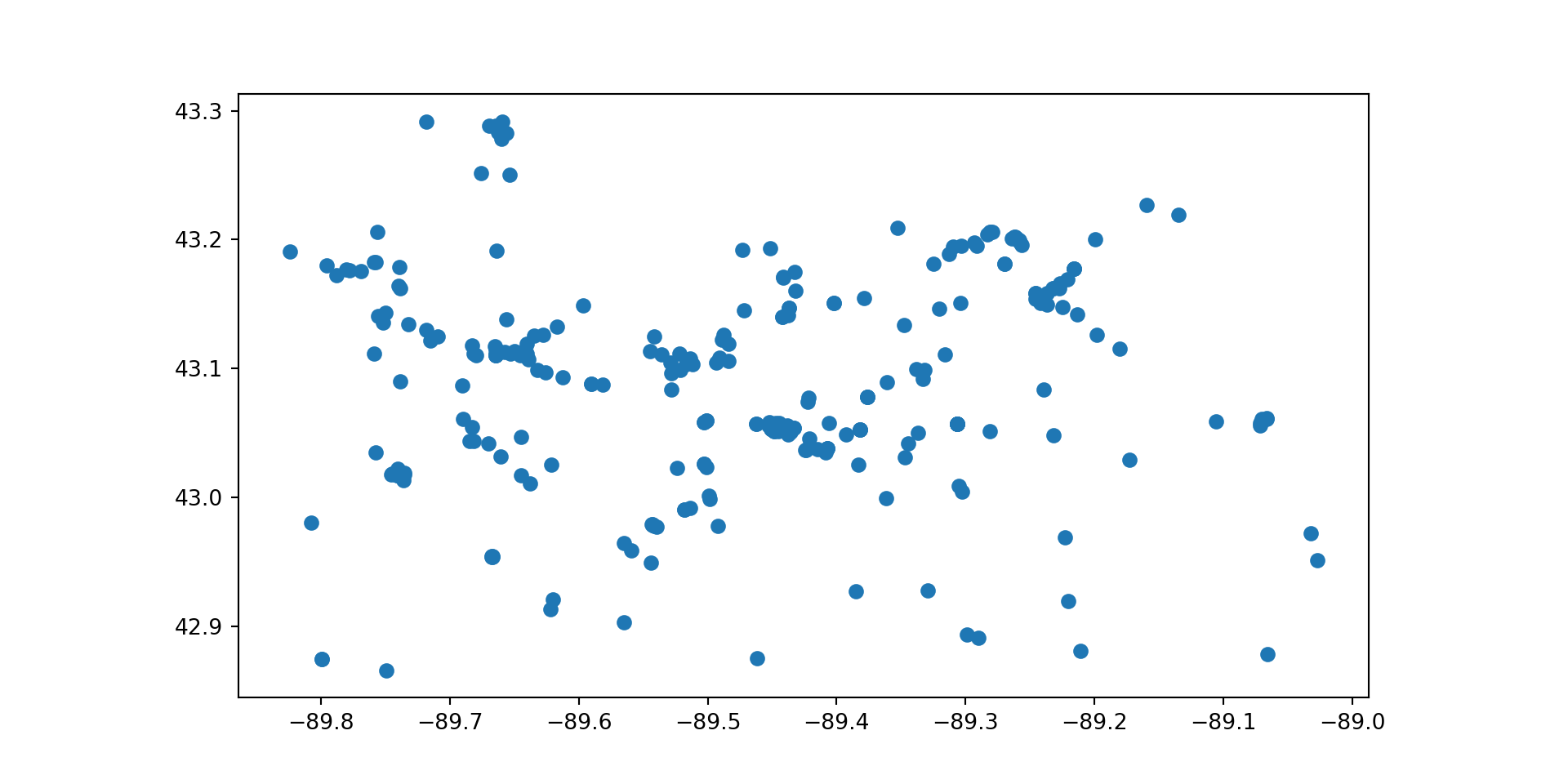
Map with geometry

library(ggplot2)

ggplot(data = site_info_refined) +
  geom_sf()

import matplotlib.pyplot as plt
import geopandas as gpd

site_info_refined.plot()

Interactive Map

library(leaflet)
#default leaflet crs:
leaflet_crs <- "+proj=longlat +datum=WGS84"

leaflet(
  data = site_info_refined |>
    sf::st_transform(crs = leaflet_crs)
) |>
  addProviderTiles("CartoDB.Positron") |>
  addCircleMarkers(popup = ~monitoring_location_name, radius = 3, opacity = 1)

If you have geopandas installed, the function will return a GeoDataFrame with a geometry column containing the monitoring locations’ coordinates. You can use gpd.explore() to view your geometry coordinates on an interactive map.

site_info_refined.set_crs(crs="WGS84").explore(
    marker_kwds=dict(radius=7),
    style_kwds=dict(opacity=1, fillOpacity=1),
    tiles="CartoDB.Positron",
)

Interactive Map

Workflow 2: Find Available Data

Let’s get all the time series in Dane County, WI with daily mean (statistic_id = “00003”) discharge (parameter code = “00060”) or temperature (parameter code = “00010”).

sites_available <- read_waterdata_combined_meta(
  state_name = "Wisconsin",
  county_name = "Dane County",
  parameter_code = c("00060", "00010"),
  statistic_id = c("00003")
)
sites_available, md = waterdata.get_combined_metadata(
  state_name = "Wisconsin",
  county_name = "Dane County",
  parameter_code = ["00060", "00010"],
  statistic_id = "00003"
)

sites_available

Selecting just a few columns:

Challenge 1

  1. How many USGS stream sites are within Tuscaloosa County, Alabama?

  2. What are the unique parameter_names that come back from those stream sites?

  3. Of those sites, what site has the longest period of record for daily mean discharge?

  4. Bonus: Create an interactive map of all sites that measure daily mean discharge.

The amount you get done during this break will highly depend on the extent of your coding background. Use this time to explore dataretrieval functions and outputs.

When these slides were generated on 2026-06-02, the results were:

1. 
[1] 99
2. 
[1] "Discharge"           "Gage height"         "Suspnd sedmnt disch"
[4] "Suspnd sedmnt conc"  "Precipitation"      
3. 
[1] "BLACK WARRIOR RIVER AT NORTHPORT AL"
[1] "1895-01-01 06:00:00 UTC"
[1] "2026-05-31 05:00:00 UTC"

Workflow 3: Get Latest Data

Let’s get the continuous discharge measurements in Dane County, WI (parameter code = “00060”) that have measured data within the last 14 days.

latest_sites <- read_waterdata_combined_meta(
  state_name = "Wisconsin",
  county_name = "Dane County",
  parameter_code = c("00060"),
  last_modified = "P14D",
  data_type = "Continuous values"
)

latest_discharge <- read_waterdata_latest_continuous(
  monitoring_location_id = latest_sites$monitoring_location_id,
  parameter_code = "00060"
)
latest_sites, md = waterdata.get_combined_metadata(
  state_name = "Wisconsin",
  county_name = "Dane County",
  parameter_code = "00060",
  last_modified = "P14D",
  data_type = "Continuous values"
)

latest_discharge, md = waterdata.get_latest_continuous(
  monitoring_location_id = latest_sites.monitoring_location_id,
  parameter_code = "00060"
)

Workflow 3: Get Latest Data

pal <- colorNumeric("viridis", latest_discharge$value)

leaflet(
  data = latest_discharge |>
    sf::st_transform(crs = leaflet_crs)
) |>
  addProviderTiles("CartoDB.Positron") |>
  addCircleMarkers(
    popup = paste(
      latest_discharge$monitoring_location_id,
      "<br>",
      latest_discharge$time,
      "<br>",
      latest_discharge$value,
      latest_discharge$unit_of_measure
    ),
    color = ~ pal(value),
    radius = 3,
    opacity = 1
  ) |>
  addLegend(
    pal = pal,
    position = "bottomleft",
    title = "Latest Discharge",
    values = ~value
  )
latest_discharge.set_crs(crs="WGS84").explore(
    marker_kwds=dict(radius=7),
    style_kwds=dict(opacity=1, fillOpacity=1),
    tiles="CartoDB.Positron",
    column="value",
    cmap="viridis",
    zoom_start=10,
)

Workflow 3: Get Latest Data

Make this Notebook Trusted to load map: File -> Trust Notebook

Workflow 4: Get All Data

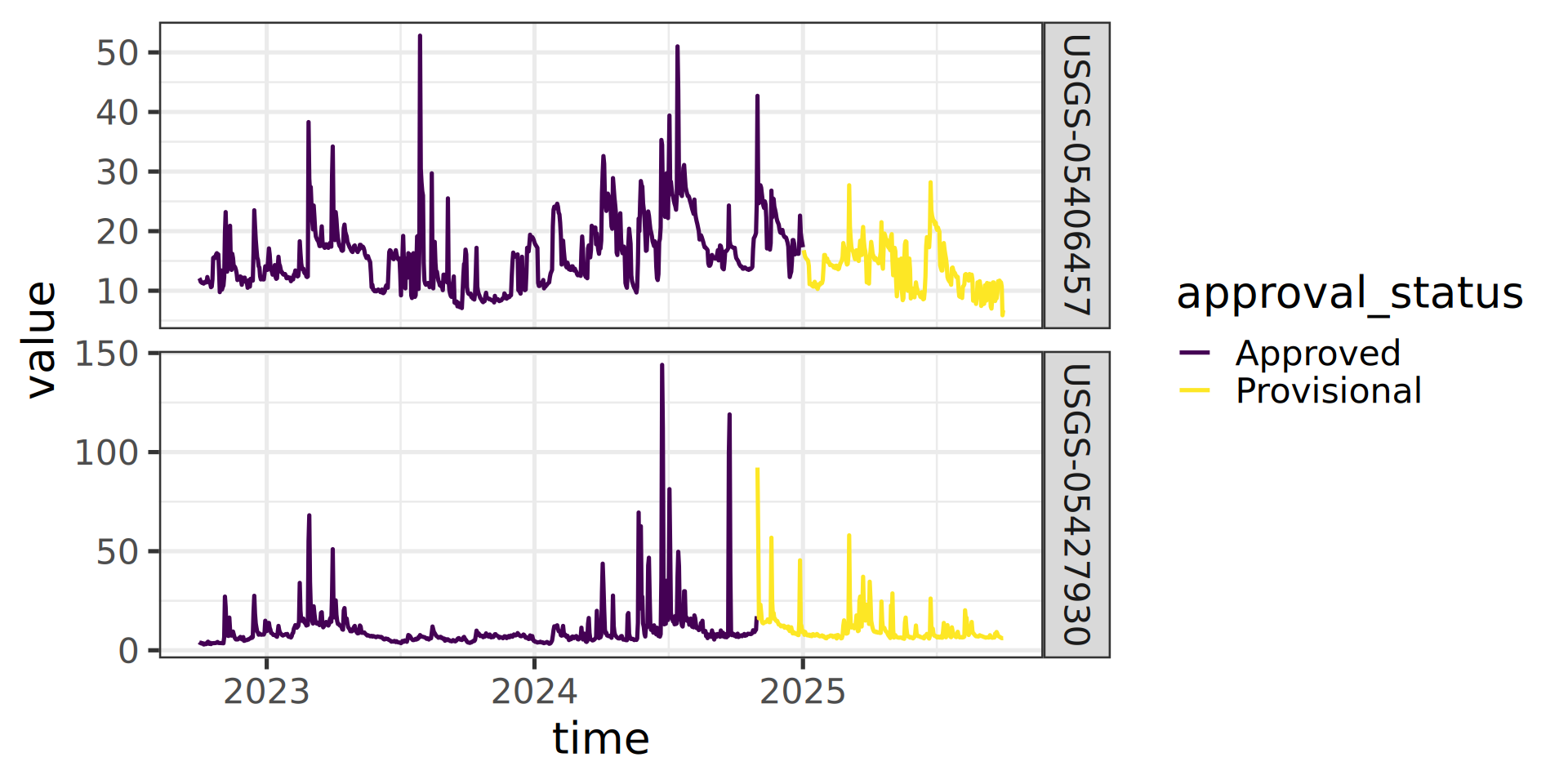
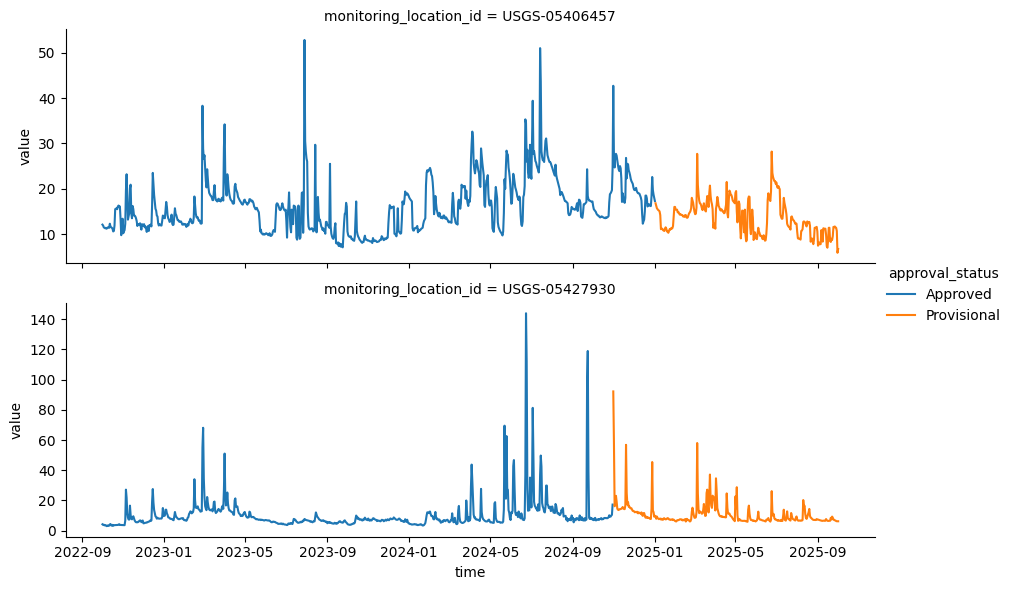
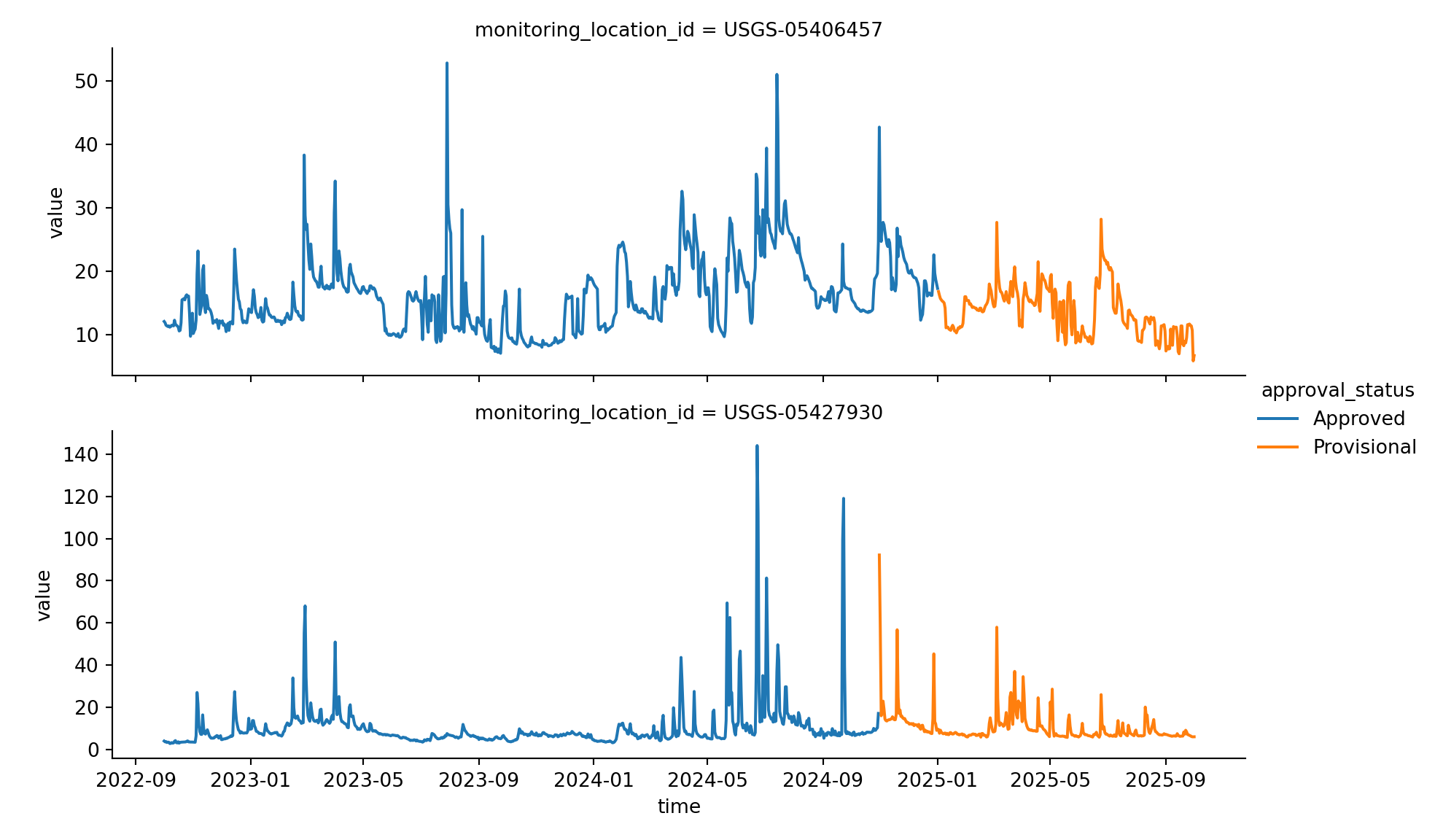
Let’s get daily discharge data for the last 3 years from 2 sites:

daily <- read_waterdata_daily(
  monitoring_location_id = c("USGS-05406457", "USGS-05427930"),
  parameter_code = c("00060"),
  statistic_id = "00003",
  time = c("2022-10-01", "2025-10-01")
)
df, md = waterdata.get_daily(
    monitoring_location_id= ["USGS-05406457", "USGS-05427930"],
    parameter_code="00060",
    statistic_id="00003",
    time="2022-10-01/2025-10-01",
)

Workflow 4: Get All Data: Plot It

ggplot(data = daily) +
  geom_line(aes(x = time, y = value, color = approval_status)) +
  facet_grid(monitoring_location_id ~ ., scale = "free_y")

import matplotlib.pyplot as plt
import pandas as pd
import seaborn

levels, categories = pd.factorize(df["approval_status"])
graph = seaborn.FacetGrid(
    df, row="monitoring_location_id", hue="approval_status", 
    height=3, aspect=3, sharey=False
)
graph.map(plt.plot, "time", "value").add_legend()

Challenge 2

  1. Navigate to the National Water Dashboard https://dashboard.waterdata.usgs.gov/app/nwd/en/

  2. Zoom in and explore sections of the map that have generally higher than normal streamflow.

  3. Zoom in and explore sections of the map that have generally lower than normal streamflow.

  4. Pick a USGS site that is interesting to you (maybe you are a kayaker, maybe you fish, maybe it’s a local stream, maybe it’s in an extreme flood/drought).

  5. Plot the daily mean discharge data for all time for the site you picked.

Workflow 5: Get Discrete Water Quality Data

Let’s get orthophosphate (“00660”) data from the Shenandoah River at Front Royal, VA (“USGS-01631000”).

site <- "USGS-01631000"
pcode <- "00660"

qw_data <- read_waterdata_samples(
  monitoringLocationIdentifier = site,
  usgsPCode = pcode,
  dataType = "results",
  dataProfile = "basicphyschem"
)
GET: https://api.waterdata.usgs.gov/samples-data/results/basicphyschem?mimeType=text%2Fcsv&monitoringLocationIdentifier=USGS-01631000&usgsPCode=00660
ncol(qw_data)
[1] 104
site = "USGS-01631000"
pcode = "00660"

qw_data, md_qw = waterdata.get_samples(
    monitoringLocationIdentifier = site,
    usgsPCode = pcode,
    service = "results",
    profile = "basicphyschem",
)

qw_data.shape[1]
101

That’s a LOT of columns returned.

USGS Samples Data Notes: Data Types and Profiles

  • There are 2 arguments that dictate what kind of data is returned
    • “dataType” defines what kind of data comes back
    • “dataProfile” defines what columns from that type come back
  • There are 2 parameters that dictate what kind of data is returned
    • “service” defines what kind of data comes back
    • “profile” defines what columns from that type come back

Data Sources

More Information